Walk Lightly on this PLANET and yet leave such a FOOTPRINT that cannot be erased for thousands of Years..!!!
Visit Codstech for Cyber Security related Posts !

Visitors

Showing posts with label VB-list/combo box. Show all posts

Sunday, June 5, 2011

VB-22 : Moving items between listbox/Combobox (Through Program)


Add items to the textbox.Then move themt, to another list/combo box.
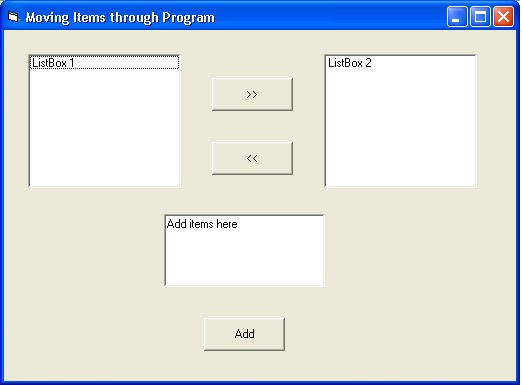
A)   Property :

       
Listbox  : NAME-List1,LIST-(Blank)
Listbox  : NAME-List2,LIST-(Blank)
Textbox : NAME-Text1,Text- (Blank)
CommandButton-NAME- Command3,Caption-Add
CommandButton-NAME- Command1,Caption- è
CommandButton-NAME- Command2,Caption- ç


B)   Attaching Code to the Object :

        
Private Sub Command1_Click()
List2.AddItem List1.List(List1.ListIndex)
List1.RemoveItem List1.ListIndex
End Sub

Private Sub Command2_Click()
List1.AddItem List2.List(List2.ListIndex)
List2.RemoveItem List2.ListIndex
End Sub

Private Sub Command3_Click()
List1.AddItem Text1.Text
End Sub


=========================================================================
Back to Home   &  VB

VB-21 : Selecting items from a listbox/Combobox (Through Program)


Our selected item will store in the list index of combo box.
     
A)   Property :
ComboBox : NAME- Combo1,TEXT-(Blank)
Textbox : NAME-Text1,Text- (Blank)
CommandButton-NAME- Command1,Caption-Add
CommandButton-NAME- Command3,Caption-Select


     B)   Attaching Code to the Object :
  
    
Private Sub Command1_Click()
Combo1.AddItem Text1.Text
End Sub

Private Sub Command3_Click()
st = Combo1.List(Combo1.ListIndex)

MsgBox (st)
End Sub


=========================================================================
Back to Home   &  VB

VB-20 : Removing items in a listbox/Combobox (Through Program)

Removing items in a listbox/Combobox (Through Program)


(A)        When we click the Remove button, the added items will remove from the list/combo box starting from 0th position.
(If we want to remove items as per our choice, then refer the next program)


     A)   Property :
ComboBox : NAME- Combo1,TEXT-(Blank)
Textbox : NAME-Text1,Text- (Blank)
CommandButton-NAME- Command1,Caption-Add
CommandButton-NAME- Command2,Caption-Remove


 B)   Attaching Code to the Object :

Private Sub Command1_Click()
Combo1.AddItem Text1.Text
End Sub

Private Sub Command2_Click()
Combo1.RemoveItem 0
End Sub


Note : Combo1.RemoveItem 0 èè The items in the list/combo box are stored as index,starting from 0,1,2,3…….etc.

That is,first item is in 0th position , second item is in 1st position etc.

========================================================================
(B)        If we want to remove items as per our choice from the list/combo box, then follow the below given steps..

(It’s your Homework :)) )
========================================================================


Back to Home   &  VB

VB-19 : Adding items in a listbox/Combobox (Through Program)


(A)        When we click the add button, “Hello “will add to the list as per our click.


     A)   Property :
Listbox  : NAME-List1,LIST-(Blank)
CommandButton-NAME- Command1,Caption-Add


     B)   Attaching Code to the Object :

Private Sub Command1_Click()
List1.AddItem”Hello”
End Sub


=========================================================================
(B)        If we want to add items to the listbox as per our choice, then follow the code given below:

     A)   Property :

Listbox  : NAME-List1,LIST-(Blank)
Textbox : NAME-Text1,Text- (Blank)
CommandButton-NAME- Command1,Caption-Add


     B)   Attaching Code to the Object :


Private Sub Command1_Click()
List1.AddItem Text1.Text
End Sub


=========================================================================

C) . Adding items in a ComboBox(Through Program)

     A)   Property :

ComboBox : NAME- Combo1,TEXT-(Blank)
Textbox : NAME-Text1,Text- (Blank)
CommandButton-NAME- Command1,Caption-Add


     B)   Attaching Code to the Object :


Private Sub Command1_Click()
Combo1.AddItem Text1.Text
End Sub


=========================================================================
Back to Home   &  VB