Walk Lightly on this PLANET and yet leave such a FOOTPRINT that cannot be erased for thousands of Years..!!!
Visit Codstech for Cyber Security related Posts !

Visitors

Showing posts with label VB-Timer. Show all posts

Sunday, June 5, 2011

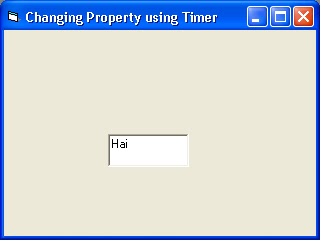
VB-18 : Changing text alignment using Timer


A)   A) Property :

Timer : NAME-Timer1, INTERVAL-2000
Textbox : NAME-Text1, TEXT-Hai


(The Timer will not appear on the output Screen )

B) B)   Attaching Code to the Object :

      
Dim flag As Integer
Private Sub Timer1_Timer()
If flag = 1 Then
Text1.Alignment = 0
flag = 0
Else
Text1.Alignment = 0
flag = 1
End If
End Sub


=========================================================================

Back to Home   &  VB

VB-17 : Colour changing using Timer


Refer Changing Color as per the entered Number also.


(A)        When we give 2000 as intervals for the first and second timer, the 2 timers will work in each 2 seconds by changing the text color in the textbo


A)   Property :


         Timer : NAME-Timer1, INTERVAL-2000
         Timer : NAME-Timer2, INTERVAL-2000
        Textbox : NAME-Text1, TEXT-Hai


B)  Attaching Code to the Object :

  
            Private Sub Timer1_Timer()
           Text1.ForeColor = &HFF0000
           End Sub

           Private Sub Timer2_Timer()
           Text1.ForeColor = 255
          End Sub


Note that &HFF0000 and 255 are the code of the colours taken from the forecolor in colour palette.

========================================================================

(B)        The same program using one timer only.(If we don’t know the first given colour)

     A)     Property :
       

   Timer : NAME-Timer1, INTERVAL-2000
   Textbox : NAME-Text1, TEXT-Hai


    B)   Attaching Code to the Object :
     
         
           Dim flag As Integer
          Private Sub Timer1_Timer()
       If flag = 1 Then
     Text1.ForeColor = &HFF&
    flag = 0
     Else
     Text1.ForeColor = &HC00000
      flag = 1
    End If
    End Sub

Note that &HFF&and &HC00000 are the code of the colours taken from the forecolor in colour palette.

  Back to Home   &  VB

Friday, June 3, 2011

VB-16 : Print using Timer

Refer  Print your name on the form also.


(1) : When we give 1000 as interval for the timer, it will work in each second by displaying the message box.

A)   Property :
Timer : NAME-Timer1, INTERVAL-1000

B)   Attaching Code to the Object :

Private Sub Timer1_Timer()
MsgBox ("Hello")
End Sub
C)   Output:
(Only after pressing the Ok button,we will get the next message box, and End will terminate the program)
=========================================================================


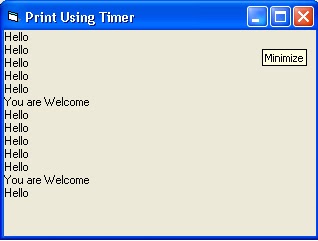
(2): When we give 1000 as interval for the timer, it will work in each second by printing “Hello”

A)   Property :
Timer : NAME-Timer1, INTERVAL-1000

B)   Attaching Code to the Object :

Private Sub Timer1_Timer()
Print "Hello"
End Sub

C)   Output:


=========================================================================

(3)        : When we give 1000 as interval for the first timer,and 5000 for the second timer , the first timer  will work in each second by printing “Hello”and the second timer will work in each 5 seconds by printing “Welcome”

A)   Property :
Timer : NAME-Timer1, INTERVAL-1000
Timer : NAME-Timer2,, INTERVAL-5000

B)   Attaching Code to the Object :

Private Sub Timer1_Timer()
Print "Hello"
End Sub

Private Sub Timer2_Timer()
Print "Welcome"
End Sub
C)   Output:


=========================================================================


Back to Home   &  VB
Wednesday, May 25, 2011

VB-5 : Phone


Place three images of phone(Click Project -> Components , then select Microsoft Common Control 6.0 ??? ,), one command button and one timer on the form.

A)   Property :
Comman Button : NAME – Command1,CANCEL-True,CAPTION-Exit
Timer                 : NAME – Timer1, INTERVAL-500
Image                 :  NAME-Main, PICTURE-(Browse the picture)
Image                 :  NAME-Ring1, PICTURE-(Browse the picture)
Image                 :  NAME-Ring2, PICTURE-(Browse the picture)

B)   Attaching Code to the Object :
Private Sub Timer1_Timer()
Static pbmp As Integer
Main.Move Main.Left + 15, Main.Top - 6
If pbmp Then
Main.Picture = Ring2.Picture
Else
Main.Picture = Ring1.Picture
End If
pbmp = Not pbmp
End Sub
-------------------------------------------------------------------

Private Sub Command1_Click()
End
End Sub

Correct this output...
 ========================================================================
Back to Home   &  VB