Walk Lightly on this PLANET and yet leave such a FOOTPRINT that cannot be erased for thousands of Years..!!!
Visit Codstech for Cyber Security related Posts !

Visitors

Showing posts with label VB-If-Else. Show all posts

Wednesday, August 10, 2011

VB-100 : To give a Message to the user

Program to give a Message to the user (Program to call a Message function Box)
Taken from VB-Tutorial CDs ...


(A)Program Design : 


(B) Property(Controls Used
  • One Command Button with Name - Command1 and Caption - Show
(C) Attaching Code to the Object :

Private Sub Command1_Click()
Dim x As Integer
x = MsgBox("Do you wish to continue..?", vbYesNoCancel)
If x = vbYes Then
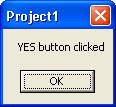
MsgBox ("YES button clicked")
ElseIf x = vbNo Then
MsgBox ("NO button clicked")
Else
MsgBox ("CANCEL button clicked")
End If
End Sub


(D) Output :


Click Show .Then a message box will appear as :


There are 3 options as Yes , No and Cancel.
Click any one of them (say , Yes) .Then another box will appear as :

 
(E) Errors :

If found any errors while running your VB program, or want to put your comment about any  program , please click Comment section , to post.


      • ====================================================================
        Back to Home   &  VB
    ===========================================================

    VB-95 : The number of digits in the entered Number

    Enter a Number.The output will say the number of digits in the number.

    Refer the same type of more complicatedprograms from  these four :
    Number of characters in a given string , 
    Total words,Characters,sentence,length of ...,
    Occurrence of a String 
    Count Blanks,Tabs,etc in a String   etc.


    (A)Program Design : 


    (B) Property(Controls Used) :
    • 2 Labels with Caption Enter a Number and You entered.
    • One More Label with Name Label3 and with No Caption (For your understanding , I am put the caption here as Label3)
    • One Command Button with Name-Command1 and Caption - Print
    (If we remove the Caption from Label3 , the form should look like as given below :)


    (C) Attaching Code to the Object :


    Private Sub Command1_Click()
    Dim n As Integer
    n = Val(Text1.Text)
    If n < 10 Then
    Label3.Caption = "a One Digit Number"
    ElseIf n < 100 Then
    Label3.Caption = "a Two Digit Number"
    ElseIf n < 1000 Then
    Label3.Caption = "a Three Digit Number"
    ElseIf n < 10000 Then
    Label3.Caption = "a Four Digit Number"
    ElseIf n < 100000 Then
    Label3.Caption = "a Five Digit Number"
    Else
    Label3.Caption = "A Number with more than Five Digit"
    End If
    End Sub


    (D) Output :

    ====================================================================

    Assignment :


    Here, I used 3 labels , and 3 Text Boxes and One Command Button (Print). Text Boxes are used to display the entered number and the number of digits.

    The output of the screen is :


    Do it yourself............

    or, see the comment section for the answer.

        • ====================================================================
          Back to Home   &  VB
      ===========================================================