Walk Lightly on this PLANET and yet leave such a FOOTPRINT that cannot be erased for thousands of Years..!!!
Visit Codstech for Cyber Security related Posts !

Visitors

Showing posts with label VB-Simple Programs. Show all posts

Wednesday, August 10, 2011

VB-99 : Print your name on the form


Print the Name on the form , through the message box appeared.
 Taken from VB-Tutorial CDs ...


(A)Program Design : 


(B) Property(Controls Used) :
  • One Command Button with Name as Command1 and Caption as Show
(C) Attaching Code to the Object :

Private Sub Command1_Click()
Dim sn As String
sn = InputBox("Enter your name to print that on the Form ", "Name", "Visual Basic")
Print sn
End Sub


(D) Output :


Click "Show".Then another Dialog Box will appear as :


In the above Picture , Visual Basic is the default Name.We can change it , if we want...  


Change the Name , and Click OK as per the picture given above :
Then we can see that ; the Name is printed on the Form.
Again , Click ,Show to add another Name.


(E) Errors :

If found any errors while running your VB program, or want to put your comment about any  program , please click Comment section , to post.


      • ====================================================================
        Back to Home   &  VB
    ===========================================================

    VB-94 : Simple Programs(3)

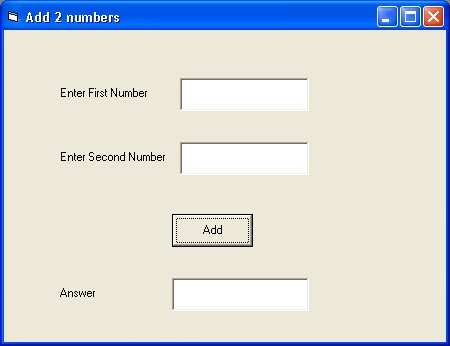
    To add 2 numbers


    (A)Program Design : 


    (B) Property(Controls Used) :
    • 3 Labels with Captions Enter First NumberEnter Second Number and Answer.
    • 3 TextBoxes with Name Text1, Text2 and Text3 , and all of the TextProperty is Blank
    • One Command Button with Name-Command1 , and Caption-Add
    (C) Attaching Code to the Object :

    Private Sub Command1_Click()
    Text3.Text = Val(Text1.Text) + Val(Text2.Text)
    End Sub


    (D) Output :


    (E) Errors :

    If found any errors while running your VB program, or want to put your comment about any  program , please click Comment section , to post.


        • ====================================================================
          Back to Home   &  VB
      ===========================================================

      VB-93 : Simple Programs(2)

      Enter your name in the TextBox , a message will attach to your name .

      Refer 
      Create a form to enter some text and have ... also

      (A)Program Design : 


      (B) Property(Controls Used) :
      • One Label with Caption "Enter your Name"
      • One TextBox ,Name-Text1 , and the Text Property is Blank..
      • One Command Button , Name-Command1 , Caption-Print
      • One more Label , Name-Label2 , and its Caption should kept  Blank (In the above given figure, the caption of Label2 is shown for your better understanding)

      (C) Attaching Code to the Object :

      Private Sub Command1_Click()
      Label2.Caption = "Welcome  " & Text1.Text
      End Sub

      (D) Output :


      (E) Errors :

      If found any errors while running your VB program, or want to put your comment about any  program , please click Comment section , to post.

          • ====================================================================
            Back to Home   &  VB
        ===========================================================

        Saturday, July 16, 2011

        VB-2 : Speed Program


        When we move the scroll bar the km/hour changes from 1 to 100, and “STOP” will close the operation.

        A)   Property :
        Textbox                    :   NAME – text1   , Text-(should kept blank)
        Command Button 1  :  NAME -  Command1, CAPTION-Stop
        Horizontal scroll bar :  min – 0, max-100

        B)   Attaching Code to the Object :
        Private Sub Command1_Click()
        End
        End Sub

        Private Sub HScroll1_Change()
        Text1.Text = Str(HScroll1.Value) + "km/hour"
        End Sub
           Private Sub Text1_Change()
        End Sub


        Back to Home   &  VB


        ===========================================