Walk Lightly on this PLANET and yet leave such a FOOTPRINT that cannot be erased for thousands of Years..!!!
Visit Codstech for Cyber Security related Posts !

Visitors

Showing posts with label VB-Select Case. Show all posts

Wednesday, August 10, 2011

VB-96 : Changing Color as per the entered Number


Changing color of form according to the entered number.

Refer Change the background color of the form and Color changing using Timer


(A)Program Design : 
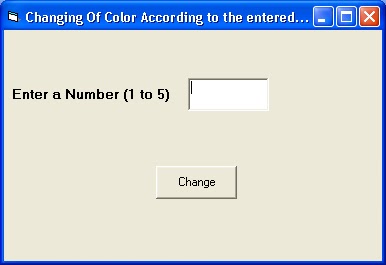

(B) Property(Controls Used) :
  • One Label with Caption Enter a Number (1 to 5) , Autosize-True , Backstyle - Transparent
  • One TextBox (Name-Text1 , Text Property is Blank)
  • One Command Button with Caption-Change and Name - Command1

(C) Attaching Code to the Object :

Private Sub Command1_Click()
Dim n As Integer
n = Val(Text1.Text)
Select Case n
Case 1
    Form1.BackColor = vbRed
Case 2
    Form1.BackColor = vbGreen
Case 3
    Form1.BackColor = vbBlue
Case 4
    Form1.BackColor = vbYellow
Case Else
    Form1.BackColor = vbWhite
End Select
End Sub

(D) Output :


===================================================================================

ASSIGNMENT :

Suppose , if you want to include another colour, and you dont know the name of that colour as given below ,
 
Then what will you do ???


This is your assignment..

If failed , see the comment section...to know the answer.

      • ====================================================================
        Back to Home   &  VB
    ===========================================================

    Saturday, May 28, 2011

    VB-14 : Making decision with Select Case

    Select Case structure is an alternative to IF..THEN......ElseIF...for selectively executing one block of statements from among multiple blocks of statements.
    You can add any number of ElseIF clauses as you need to provide alternative choices.A better way to choose between several alternatives is the Select Case statement as in the example given below:


    Let there be a text field in which the user is supposed to enter the choices from a range of options given.


    Enter any fruit from one of the following choices : Mango,apple,banana,orange and pineapple.


    A)   Property :
    Comman Button : NAME – Command1,CAPTION-Submit
    Text Box          :NAME-text1,TEXT-(Blank)


    B)   Attaching Code to the Object :
    Private Sub Command1_Click()
    Select Case Text1.Text
    Case "Mango"
    MsgBox "Mango is in green colour"
    Case "Banana"
    MsgBox "Banana is in yellow colour"
    Case "Orange"
    MsgBox "Orange is in orange colour"
    Case "Apple"
    MsgBox "Apple is in red colour"
    Case "Pineapple"
    MsgBox "Pineapple is in cream colour"
    Case Else
    MsgBox "The fruit you choose is not in the list"
    End Select
    End Sub

     ========================================================================
    Back to Home   &  VB